
A friend of mine asked me what a website should cost. She had three quotes sitting in her inbox: a DIY platform charging $12 a month, a freelancer asking $3,500, and an agency that wanted $24,000. Same business, same goals, same five-page brochure site. The numbers were two thousand percent apart.
She wasn't being scammed. All three quotes were honest. They were just for very different things, sold in a way that made the differences impossible to see from the outside.
That's the problem with the question "how much does a website cost?" It's like asking how much a car costs. Are we talking a used Civic, a new F-150, or a Sprinter van outfitted as a mobile clinic? All are vehicles. None of them are interchangeable.
This post is the answer I wish someone had given her, broken into the three real paths a small business can take in 2026, with the hidden costs each one tries not to advertise. By the end, you'll know which path actually fits your situation, and you'll have free tools to pin down a number for yours specifically.
The Three Paths (And Why They Look Identical From The Outside)
Every website you see online came from one of three places:
- A DIY platform like Wix, Squarespace, Shopify, or Webflow, where the business owner built it themselves.
- A freelancer or small studio who built it custom, usually on something like WordPress, Webflow, or a modern framework like Next.js.
- A full agency with project managers, designers, copywriters, and developers, who builds enterprise-grade sites with strategy work baked in.
To a website visitor, a $1,200 site and a $40,000 site can look almost identical on a phone screen. That's why the pricing feels random. The differences are in what you don't see: load speed, search ranking, conversion design, integrations, ownership, and what happens when you need to change something a year from now.
Let's break each path down honestly.
Path A: Build It Yourself On A Platform
This is the cheapest path on the sticker, and it's the right answer for a lot of brand-new businesses that need to exist online before anything else.
The major players in 2026:
- Wix. Core plan around $29.77/mo, Business plan around $39.77/mo.
- Squarespace. Core plan around $29/mo, Plus around $49/mo.
- Shopify. Basic at $29/mo, plus 2% third-party transaction fees if you don't use Shopify Payments.
- Webflow. Basic around $15/mo, Premium around $25/mo. Premium replaced the old CMS and Business plans in May 2026.
- GoDaddy Website Builder. Basic around $9.99/mo, Commerce around $20.99/mo, at introductory rates that go up on renewal.
Prices are per month on annual billing, as of September 2026. Month-to-month billing costs more on every platform.
Sounds great. A few hundred bucks a year and you're online. So what's the catch?
The catch is the 5-year true cost almost always lands two to three times higher than the sticker. Here's where that extra money goes:
- Tier creep. You start on a starter plan, then you hit a feature wall ("you need Business to remove ads" or "you need Commerce to accept payments") and you upgrade. You rarely downgrade.
- Premium apps and add-ons. Most platforms have a marketplace of paid apps for booking, forms, reviews, abandoned cart recovery, and similar. They run $5 to $25 each per month and quietly stack up.
- Transaction fees. Shopify charges 2% if you use a third-party payment processor. Squarespace charges 2% on every sale on its Basic plan. On a store doing $5,000 a month, a 2% fee is $1,200 a year you don't see in the headline price.
- Email and domain. Custom domain is usually free for the first year, then renews at $15 to $25 a year. A branded mailbox runs $6 to $12 a month per address.
- Lock-in. You don't own the underlying code. If you ever decide to leave, you're rebuilding from scratch on the new platform. That's a hidden switching cost that gets bigger every year you stay.
Honest 5-year totals for a small business site, fully loaded with the apps and tier you'll probably end up needing: $2,500 to $6,500, sometimes more if you're doing ecommerce volume.
If you want the real, vendor-by-vendor breakdown with hidden costs called out per platform, the JDX team built a platform pricing reference that checks each vendor's pricing page where it can, cross-checks against industry guides, links every source, and gets refreshed every quarter. No signup, no email gate.
Path B: Pay Someone To Build It For You
This is the path most established small businesses end up on once they outgrow DIY. It splits roughly into three tiers based on who's doing the work.
Freelancer or solo developer: $1,500 to $8,000 for a build
You're hiring one person, often working evenings, who can build you a clean five to ten page site on WordPress, Webflow, or a similar tool. They're affordable because their overhead is low. The trade-off: limited capacity, sometimes inconsistent design taste, and a real risk that a year from now they've moved on to a full-time job and aren't picking up your support emails.
Small studio: $8,000 to $25,000 for a build
You're hiring a small team that does design and development together, usually on a modern stack like Next.js (which is what JDX uses). You get better performance, custom design that matches your brand, real strategy conversations during the project, and someone you can call a year later to add a new feature without it being a renovation.
Not every project needs that full range, though. JDX also offers a fixed-price starter site at $2,000 for a five-page site, plus $45 a month for hosting and management, for businesses that need something clean and fast without a custom scope.
Full agency: $25,000 to $100,000+ for a build
Now you're paying for project managers, dedicated designers, dedicated developers, copywriters, and often a strategy phase that runs weeks before any code gets written. This is the right choice when the website is genuinely mission-critical and the cost of getting it wrong is large. It's overkill for most small businesses.
What actually moves the price within each tier:
- Page count. A five-page brochure site is one job. A 40-page site with multiple landing pages is a different one.
- Custom design vs. template. A theme tweaked to your colors costs less than design from scratch.
- Ecommerce. A real store with inventory, shipping logic, and tax handling is meaningfully more work than a brochure site.
- Integrations. CRM, email marketing, scheduling, payment, accounting tie-ins all add scope.
- Regulated industry. Healthcare, finance, federal contracting, and legal sites need extra care around accessibility, compliance, and security. That work is real and it costs.
If you want a real number for your specific scope rather than a wide range, the JDX team built a project scoping calculator that shows the starting price for your site, store, or web app in about two minutes. No signup required. When you want an exact quote, book a free 30-minute call with the JDX team.
The Question Most People Skip: Do You Even Need A CMS?
Here's a question almost nobody asks before they start shopping: does your business actually need the platform you think you need?
A content management system, or CMS, is what powers Wix, Squarespace, WordPress, and similar tools. It lets non-technical people log in and edit pages. That's useful when you're publishing new content weekly. It's overkill when your site is a brochure that you'll update twice a year, max.
Most small business sites are brochures. The owner builds it once, updates the phone number when they move offices, and otherwise leaves it alone for years. For those sites, paying $30 a month forever for a CMS you don't use is genuinely wasted money. A static site, hosted for almost nothing on something like Vercel or Netlify, would do the same job for a fraction of the cost.
The trade-off is you can't log in and tweak the homepage yourself. You'd need to ask whoever built it to make changes. For a lot of small businesses that's actually a feature, not a bug. The site stays clean because nobody's logging in at midnight to add a stretched logo.
We built a free CMS fit decision tool that walks you through five questions and tells you honestly whether a CMS is worth the overhead for your specific situation. It's the question we wish more prospects asked us before they signed up for a platform.
The 5-Year Cost Picture, Side By Side
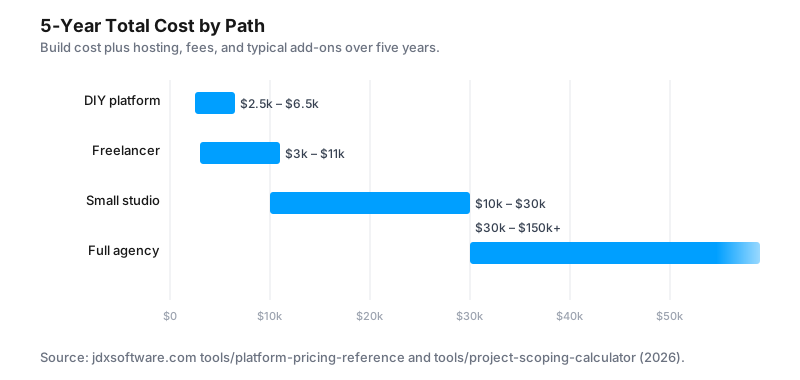
Pulling all of this together, here's roughly what each path costs over five years for a typical small business marketing site.
| Path | Typical build cost | 5-year total | Best for |
|---|---|---|---|
| DIY platform | $0 (your time) | $2,500 – $6,500 | New businesses validating demand |
| Freelancer | $1,500 – $8,000 | $3,000 – $11,000 | Established small biz on a budget |
| Small studio | $8,000 – $25,000 | $10,000 – $30,000 | Growing biz that needs to differentiate |
| Full agency | $25,000 – $100,000+ | $30,000 – $150,000+ | Regulated, complex, mission-critical |
A few honest caveats. The DIY number assumes you already know how to build a site, or you're willing to spend 40 to 80 hours of your own time learning. That time has a real cost too. The custom-build numbers assume the site is doing a job for the business: bringing in leads, closing deals, supporting customers. A site that costs more but produces five times more revenue is the cheaper website in any meaningful sense.
The right question isn't "what's the lowest sticker price." It's "what does this website need to do for the business, and which path delivers that for the lowest total cost over the next five years."
How To Pick Your Path
A short rubric, based on what we tell prospects when they ask:
- You're brand new and validating whether the business even works. Go DIY. Pick the simplest platform that lets you accept payments or capture leads. Don't spend money on custom until you've proven there's demand.
- You're established, the business is growing, and the site needs to differentiate you from competitors. Hire a freelancer or small studio. The difference between a generic template and a site that actually reflects your brand is significant, and it pays for itself when prospects compare you against the cheaper-looking competition.
- You're in a regulated industry, you have complex integrations, or the website is mission-critical. Hire a real agency or a specialist studio. The extra cost buys you accountability, strategic input, and a level of polish that matters when the stakes are high.
Most small businesses fit the middle category. Most of them think they fit the first one until they see what their competitors' sites look like.
Tools To Pin Down Your Number
If you've read this far, you probably have a rough sense of which path fits your situation. The next step is getting a real number rather than a range. The JDX team built three free tools for exactly that:
- CMS fit decision tool. Five questions to figure out if you actually need a CMS, or if a static site would save you thousands.
- Platform pricing reference. Honest 5-year cost breakdowns for Wix, Squarespace, Shopify, Webflow, WordPress, and GoDaddy. Updated quarterly.
- Project scoping calculator. Pick a package, set your page count, and see your starting price. Anything extra you need goes on a checklist for the call, not onto the price.
All three are free, no signup, no email gate. They exist because we got tired of watching small businesses get sold the wrong thing.
If after running through them you'd rather just talk it out, book a free 30-minute call with the JDX team. No pitch deck, no upsell, no follow-up sequence. Just an honest conversation about what your business actually needs.
The JDX newsletter
Liked this? Get the next one, plus a free checklist.
New posts, new tools and demos, and the occasional offer. You’ll get the Website Cost Checklist right away.
About once or twice a month. Unsubscribe anytime.